3.4 Network hardware
This topic explains the hardware and addressing used to connect devices and move data between networks: network interface cards, MAC addresses, IP addresses, DHCP, DNS and routers.
What you need to understand
You should be able to explain why a NIC is needed, describe the structure and purpose of MAC and IP addresses, distinguish IPv4 from IPv6 and static from dynamic addressing, explain the roles of DHCP and DNS, compare MAC and IP addressing, and describe how routers connect networks and direct packets.
Network interface card (NIC)
A network interface card (NIC) is required for a device to connect to a network, including the internet. It is normally built into the device hardware and contains the device's Media Access Control (MAC) address, which is generated at the manufacturing stage.
Wireless network interface card/controller (WNIC)
A wireless NIC/controller (WNIC) has the same basic purpose as a wired NIC, but it communicates wirelessly. It uses an antenna and communicates with the network using microwaves. A WNIC may be built into the device as an integrated circuit or connected through a USB port.
Media Access Control (MAC)
A MAC address identifies a network interface at the device level. The textbook represents a MAC address as 48 bits, shown as six groups of hexadecimal digits.
The first three groups identify the manufacturer's code and the final three groups form the device serial number. The book gives 00 – 1C – B3 – 4F – 25 – FF as an example. If the NIC is replaced, the MAC address changes because the address belongs to the network interface hardware.
Universally and locally administered addresses
UAA — Universally Administered Address
The normal form of MAC address. It is set by the manufacturer at the factory and is rarely changed by the user.
LAA — Locally Administered Address
A MAC address deliberately changed locally. It must still be unique on the relevant network to avoid address conflicts.
The source gives several situations in which organisations may use an LAA: to fit a required address format on some systems, to satisfy network filtering rules, or to emulate an allowed address format where network restrictions depend on MAC addresses. These are network-administration uses; changing addresses carelessly can create conflicts.
Internet protocol (IP) address
When a device joins a private network, a router assigns it a private IP address. That address must be unique on that particular private network, although another separate network could use the same private address. When the router connects to the internet, it has a unique public IP address, usually supplied by the internet service provider (ISP). Devices behind the same router share that public IP address externally while keeping different private addresses inside the local network.
Internet communication follows agreed protocols — rules that senders and receivers follow. IP addressing is part of this system because packets need addresses that allow data to be routed to the correct network and device.
IPv4 and IPv6
| IPv4 | IPv6 |
|---|---|
| Uses 32 bits. | Uses 128 bits. |
| Written as four groups of 8 bits shown in denary, e.g. 254.25.28.77. | Written as eight groups of hexadecimal digits separated by colons, e.g. A8FB:7A88:FFF0:0FFF:3D21:2085:66FB:F0FA. |
| Smaller address space. | Created to support the continued growth of internet-connected hosts and traffic. |
The textbook identifies three advantages of IPv6 over IPv4: it removes the risk of IP address collisions, includes built-in authentication checks, and allows more efficient packet routes.
Static and dynamic IP addresses
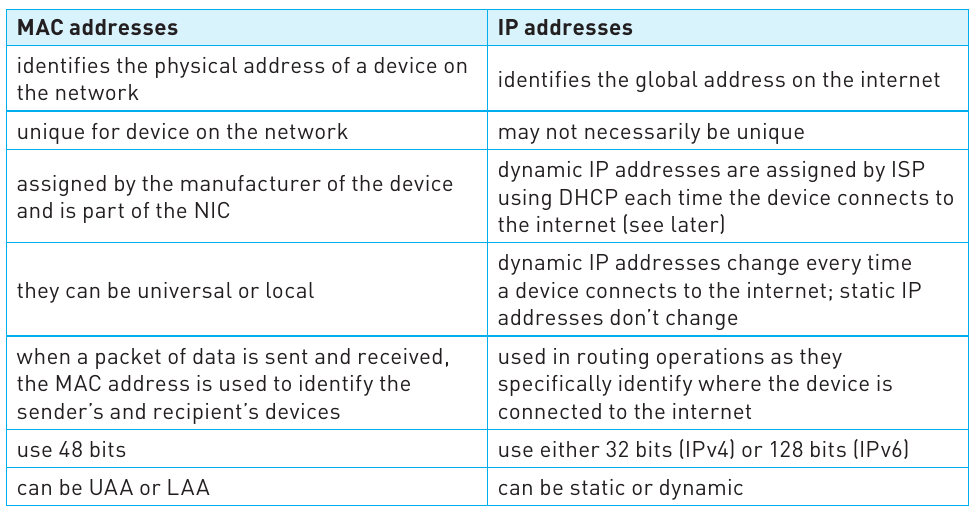
An IP address can be static or dynamic.
Static IP address
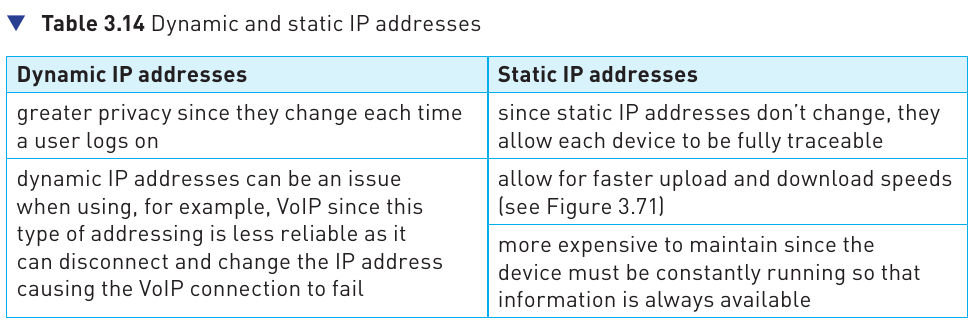
Permanently assigned by the ISP and does not change each time the device connects. The source gives website servers, online databases and FTP servers as common examples because these services benefit from a consistent address.
Dynamic IP address
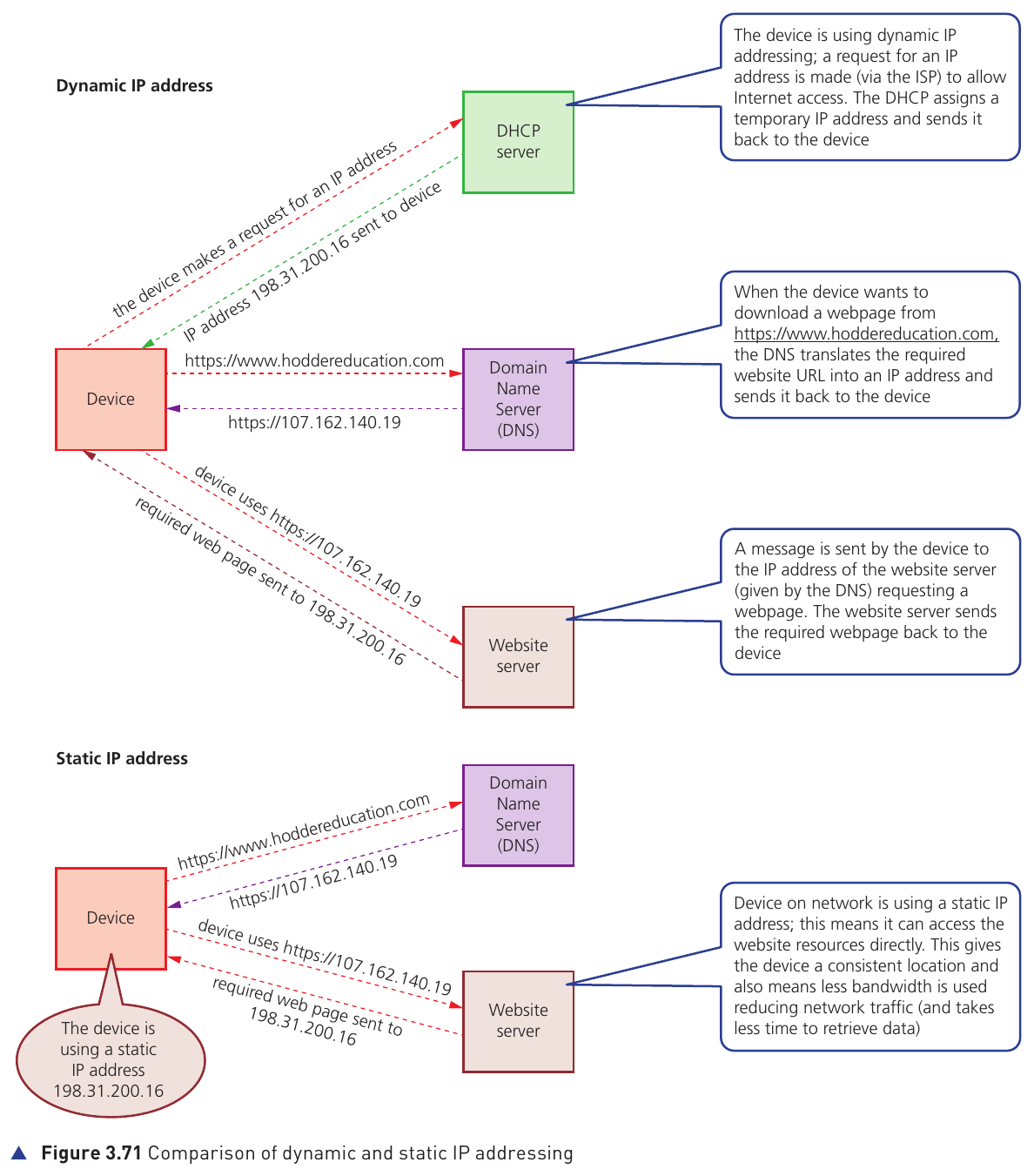
Assigned by the ISP when the device connects. A Dynamic Host Configuration Protocol (DHCP) server automatically supplies the temporary address, so the address may be different on a later connection.
DHCP, DNS and contacting a website
With dynamic addressing, the device first requests an IP address and the DHCP server supplies one. When the user enters a website URL, a Domain Name Server (DNS) translates the domain name into the IP address of the website server. The device can then send its request to that server and receive the required webpage.
Routers
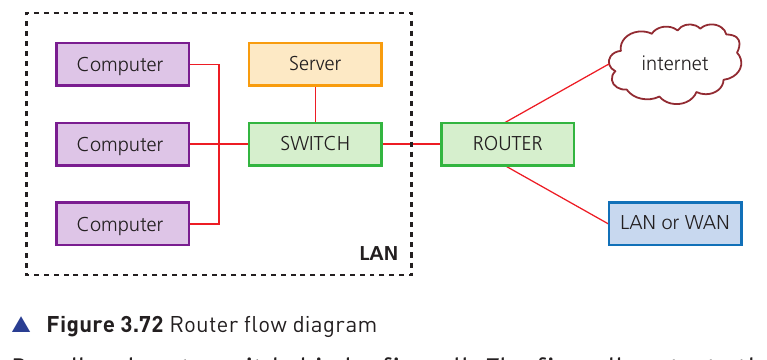
A router enables data packets to move between different networks — for example, connecting a local area network (LAN) to a wide area network (WAN) or the internet. The source also describes a router as enabling communication between networks that may use different protocols/formats.
How the router fits into a network
- Broadband routers sit behind a firewall, which protects computers on the network.
- The router connects private networks and forwards traffic between networks.
- The router inspects incoming data packets and uses IP addressing to decide which network path the packet should take.
- On the local network, a switch can then use the destination MAC address to deliver the data to the correct device.
- If the destination MAC address is not on one switch, the packet can continue through the network until the appropriate device is found.
- Routers can be wired or wireless.
IP address and MAC address work together
IP addressing is used for routing between networks and identifying where the device is connected. MAC addressing identifies the actual network interface/device on the local network. This is why both kinds of address appear in network communication.
Extension: computer ports and wired/wireless networks
The textbook places the following material in an Extension box for students considering further study. It is included here so the topic page does not omit material from the source, but the four numbered 3.4 subtopics above remain the core topic structure.
USB ports
USB uses asynchronous serial transmission. A typical USB cable has four wires: two for power/earth and two for data. When a USB device is connected, the computer detects it, recognises the device and loads the appropriate device driver; if no suitable driver is available, the user may be prompted to obtain it. The source notes advantages such as automatic detection, one-way connector fitting, industry-wide support, multiple data rates and backward compatibility, alongside limitations such as transmission-rate limits in the described standard and a cable length of about five metres.
HDMI
HDMI carries digital audio and visual output to an HDMI-enabled monitor or other device. It replaced older analogue VGA connections for many modern displays. The extension links the need for HDMI bandwidth to widescreen high-definition images, large pixel counts, faster refresh rates and large colour ranges.
Wi-Fi and Bluetooth
Both are wireless technologies using electromagnetic radiation. The source describes Bluetooth as using channels around 2.45 GHz and spread-spectrum frequency hopping to reduce interference. It is suited to short-range, lower-bandwidth communication. Wi-Fi is presented as more suitable for full network access because of its higher transfer rates, greater range and stronger network capability.
Wired network media
The extension identifies three main cable types: twisted pair, coaxial cable and fibre optic cable.
Wired versus wireless
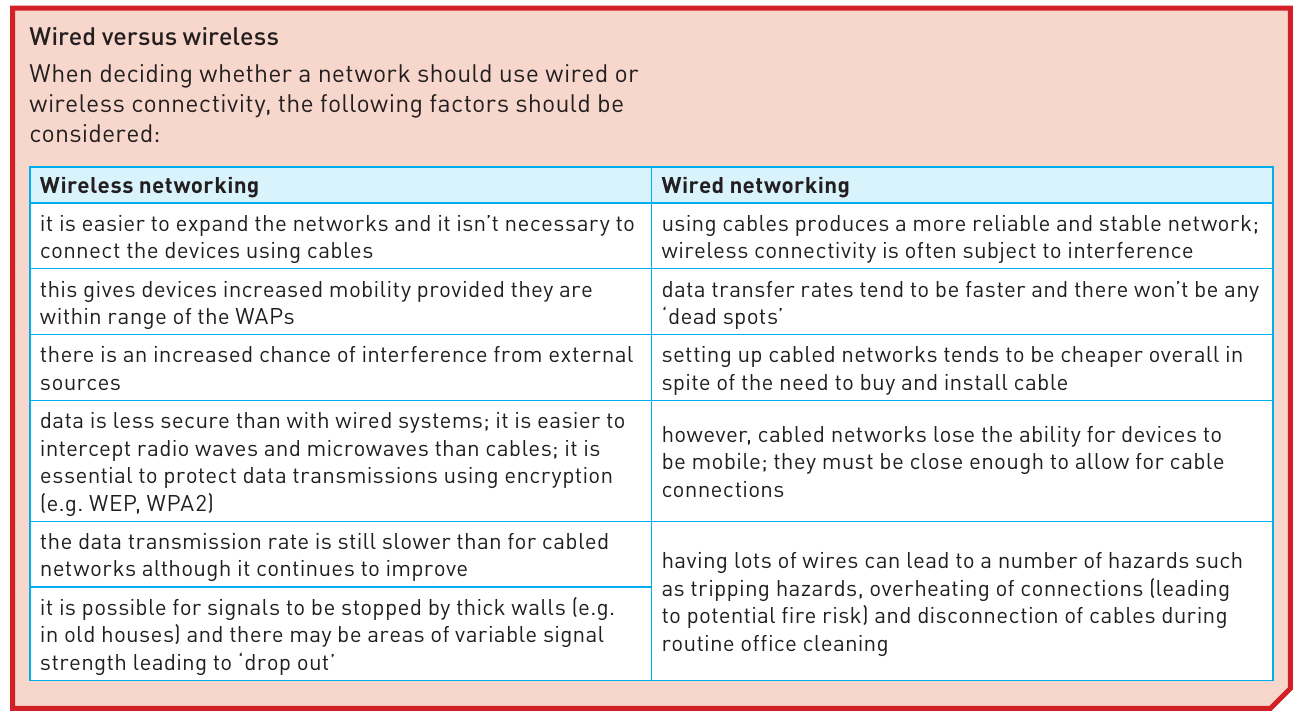
Wireless networking is easier to expand and gives devices more mobility, but it is more exposed to interference, signal drop-out and interception. Wired networking generally offers a more stable connection and faster transfer rates, but cables reduce mobility and can introduce physical hazards or disconnection problems.