5.1 The internet and the World Wide Web (WWW)
The internet and the World Wide Web are closely connected, but they are not the same thing. This topic explains how the internet provides the underlying worldwide network, how the Web uses it to deliver pages and resources, how URLs and HTTP/HTTPS are used, how browsers locate and display web pages, and how cookies store information between visits.
What you need to understand
You should be able to distinguish the internet from the World Wide Web; identify the parts of a URL; explain HTTP and HTTPS; describe the purpose and features of a browser; explain how DNS helps locate and retrieve a web page; and compare session and persistent cookies, including their uses.
The differences between the internet and the World Wide Web (WWW)
The word internet comes from interconnected network. It is the worldwide system that links networks and individual devices together. Although we often speak of “the internet” as if it were one object, it is better understood as a global network of networks that depends on physical infrastructure such as cables, routers, switches and other networking hardware.
The World Wide Web (WWW) is only one service that uses the internet. It is the huge collection of web pages and other web resources that users access with web browser software. The Web therefore depends on the internet, but the internet can also be used for activities that are not the Web, such as sending email or online communication.
| Internet | World Wide Web (WWW) |
|---|---|
| Worldwide collection of interconnected networks and devices. | Collection of multimedia web pages and other information held on websites. |
| Can be used to send and receive email. | Web resources are accessed using web browsers. |
| Supports online communication such as text, audio and video chat. | Uses URLs to specify the locations of websites and web pages. |
| Makes use of transmission and internet protocols such as TCP and IP. | Web pages use HTML, and web transfers use HTTP or HTTPS. |
| Provides the network used to reach servers and other devices. | Uses the internet to obtain information from web servers. |
Uniform resource locators (URLs)
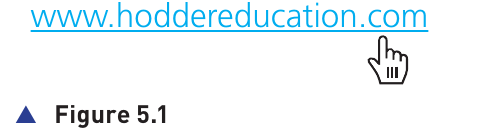
A Uniform Resource Locator (URL) is the text address used to locate and access a website or a particular resource on the Web. A user can type a URL into the browser's address bar, or reach the same URL by selecting a hyperlink.
The general form described in the topic is:
Parts of a URL
Protocol
The protocol is normally http or https. It tells the browser which set of rules is being used to transfer the web resource.
Website address
The website address can contain the domain host (such as www), the domain name, a domain type such as .com, .org, .net or .gov, and sometimes a country code such as .uk, .de or .cy.
Path
The path identifies the page or location inside the website. When the path is omitted, the browser normally requests the site's root location.
File name
A file name can identify a particular item or resource at the requested location.
Example
https://www.hoddereducation.co.uk/ict
https is the protocol. www is the domain host. hoddereducation is the domain name. .co.uk includes the domain type/country part, and /ict is the path requested from the website.
HTTP and HTTPS
Hypertext Transfer Protocol (HTTP) is a set of rules used when files and web content are transferred across the internet. A browser and web server follow the same protocol so that requests and responses can be understood.
HTTPS is the secure form of HTTP. When security such as SSL or TLS is used, the connection is protected while data is being sent and received. The S in HTTPS stands for secure.
| HTTP | HTTPS |
|---|---|
| Rules for transferring web files/data across the internet. | Uses the same web-transfer purpose but adds security to the connection. |
| Shown with the http scheme in a URL. | Shown with the https scheme in a URL. |
| Does not by itself indicate the secured connection described in this topic. | Uses security technology such as SSL or TLS to provide a more secure way to send and receive data. |
Web browsers
A web browser is software that allows a user to access and display web pages on a device. Websites send content written in HTML (HyperText Markup Language); the browser interprets that HTML and presents the resulting page, which may include text, images, audio and video.
Browsers provide features that make navigation and repeated use of websites easier:
- Home page: a page that can be opened as the browser's starting page.
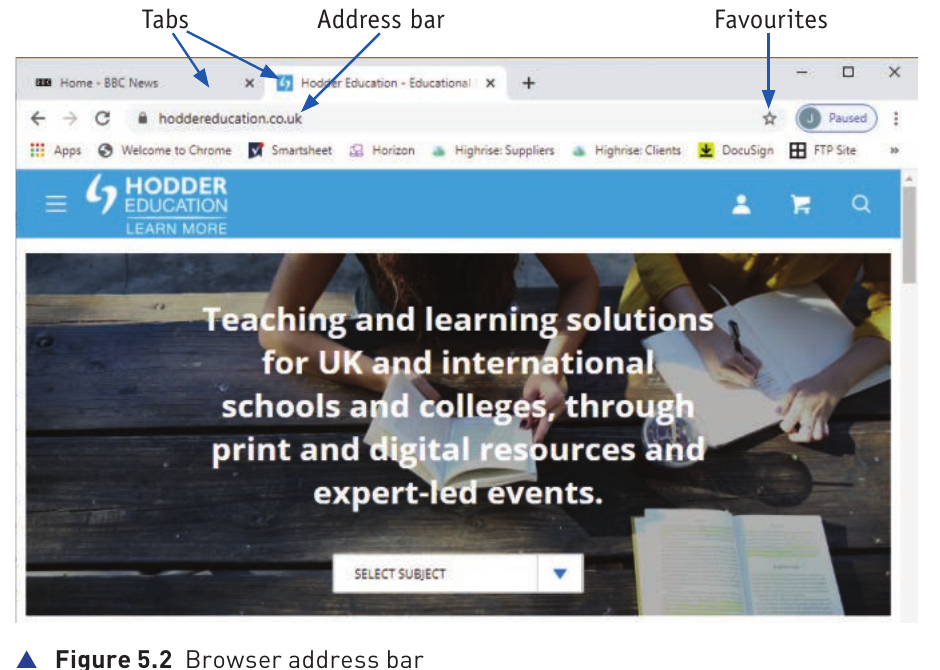
- Bookmarks/favourites: save web pages so the user can return to them quickly.
- History: keeps a record of websites/pages the user has visited.
- Back and forward navigation: moves between pages that have already been opened.
- Multiple tabs: allows several web pages to remain open at the same time.
- Cookies: lets websites store small items of information in the browser/device; these are covered in 5.1.6.
- Hyperlinks: allow navigation to another page or website. The textbook example shows a normal click opening the link in the current tab and Ctrl + click opening it in a new tab.
- Cache: browser data can be stored for reuse.
- JavaScript: browsers can run JavaScript used by web pages.
- Address bar: displays or accepts the URL of the page to be accessed.
Retrieval and location of web pages
Websites are written in HTML and stored on web servers. A web server has an IP address. The browser needs to reach that address before the required page can be downloaded.
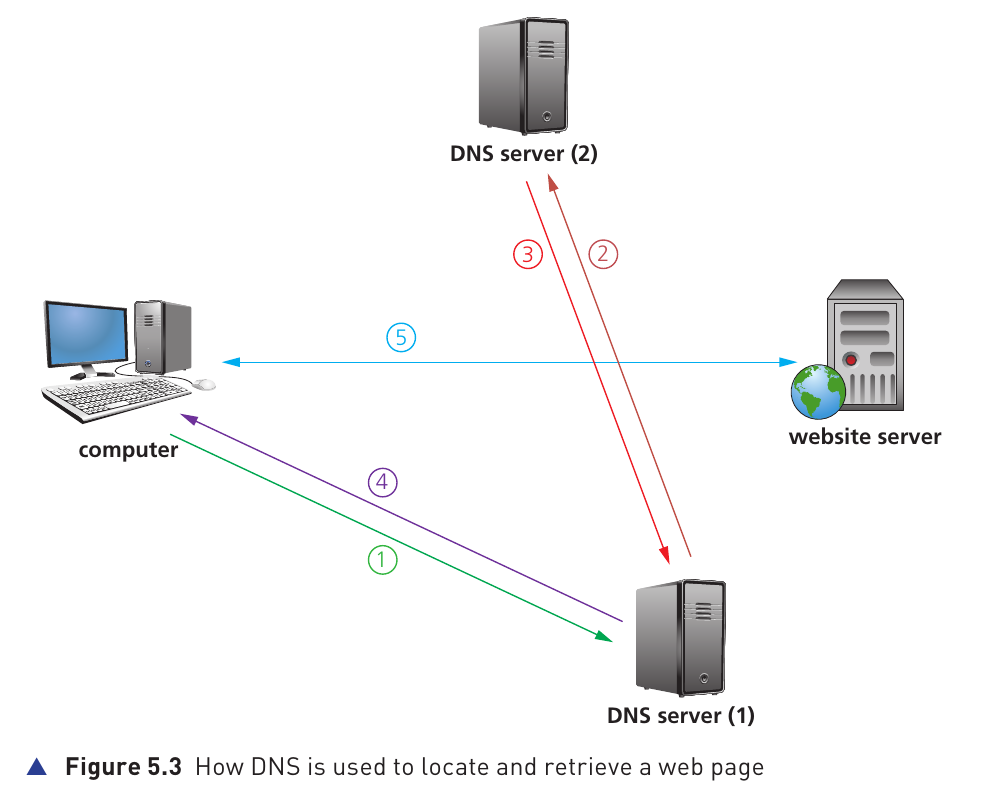
Users normally enter a domain name instead of memorising an IP address. A Domain Name Server (DNS), also described as part of the domain name system, finds the IP address that matches the domain name in the URL. DNS servers hold mappings between domain names/URLs and their corresponding IP addresses, and they can also use cached results.
How the page is located and returned
- The user opens a browser and enters a URL. The browser asks a DNS server for the website's IP address.
- If the first DNS server does not have the required mapping in its database or cache, it sends a request to another DNS server.
- When a DNS server finds the matching IP address, that address is returned. The first DNS server can also store the mapping in its cache/database.
- The website's IP address is sent back to the user's computer.
- The computer establishes communication with the web server. The required HTML files are downloaded, and the browser interprets the HTML and displays the page.
Cookies
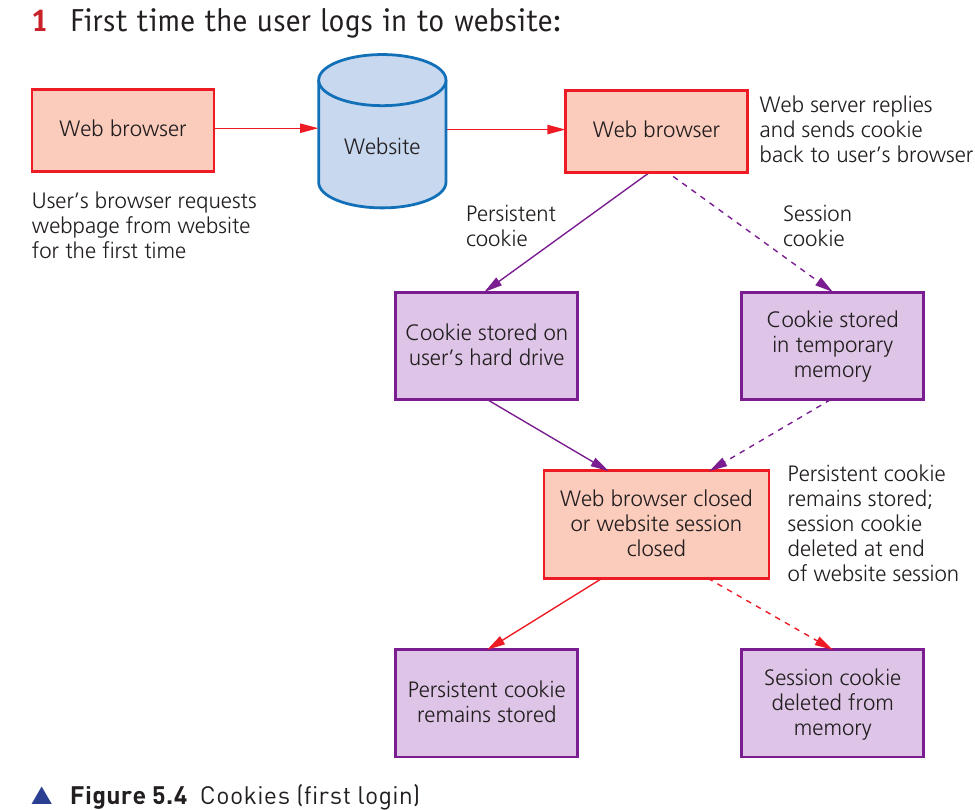
Cookies are small files or small pieces of code stored on a user's computer/device by a website through the browser. A cookie can hold pairs of values, such as a key and associated data. When the user returns to the website, the browser can provide the stored cookie so that the site recognises information about the user or their previous activity.
Cookies can maintain preferences such as language or currency, remember activity from an earlier visit and help customise what the website displays. The topic distinguishes two main types: session cookies and persistent (permanent) cookies.
Session cookies
A session cookie is temporary. It is held in temporary memory while the browser session is active. One common use is keeping items in a virtual shopping basket while the user moves between pages. A cookie with no expiry date is treated as a session cookie. In the textbook description, a session cookie does not collect information from elsewhere on the user's computer and does not personally identify the user. It is removed when the browser is closed or the website session ends.
Persistent cookies
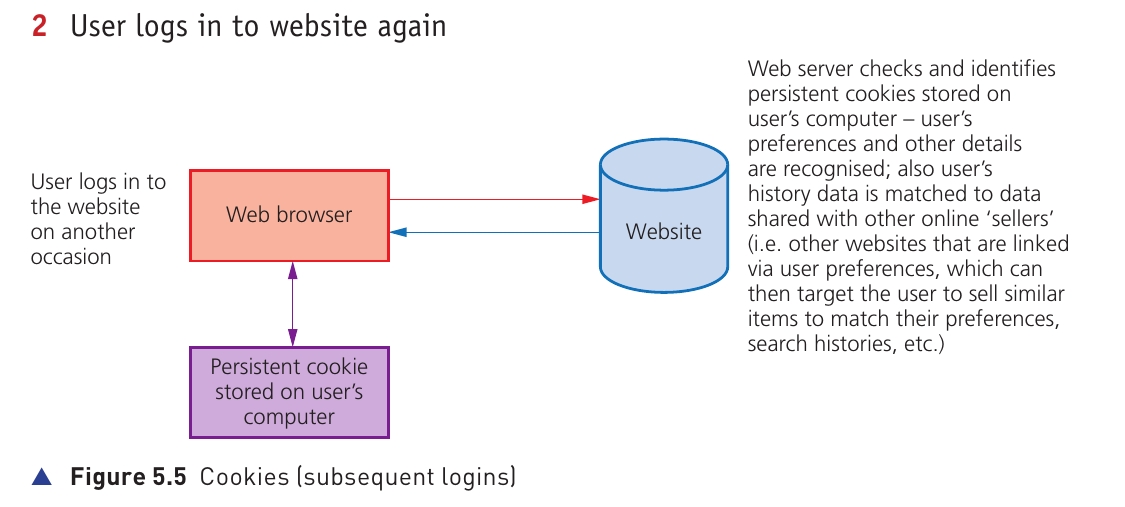
A persistent cookie remains stored after the browsing session has ended. It can remember login details or other preferences so the website can recognise the user's browser during a later visit. It remains until its expiry condition is reached or the user deletes it. This removes the need to enter the same information every time the site is visited and allows data to be carried from one session to the next.
The textbook also notes that more personal information should only be stored when the user has provided it and agreed to it being stored, and that legitimate websites protect such personal information using encryption. It describes legal controls intended to limit how long some persistent cookies remain active. Persistent cookies also reduce the amount of per-user information that a web server would otherwise need to store centrally and make it easier to recognise a returning browser without requiring a fresh login every time.
| Session cookie | Persistent cookie |
|---|---|
| Stored temporarily for the current session. | Stored on the user's storage and remains between sessions. |
| Removed when the browser is closed or the website session ends. | Remains until it expires or is deleted. |
| Useful for temporary state such as items in an online shopping basket. | Useful for remembering login details, preferences and activity across visits. |
Uses of persistent cookies
- Remember passwords, email addresses and details entered for later visits.
- Allow a website to recognise a returning user.
- Keep or restore items in a virtual shopping basket/cart.
- Track browsing habits, website history and favourites/bookmarks.
- Help target advertising according to previous purchasing or browsing behaviour.
- Store user preferences and support customised web pages.
- Support online financial transactions.
- Save progress in online games and quizzes.
- Help social-networking sites recognise preferences and browsing history.
- Remember language choices so the appropriate language can be used when the user returns.